
Dashboard guide
Investigate reused results before clearing them
Inspect cache inventory and freshness, narrow the diagnostic view and choose the smallest intended troubleshooting action.

Short answer
Caching gives an authorized administrator a view of reusable assistant results and their diagnostic metadata. Review inventory and source freshness, search or filter the entries and identify the smallest relevant scope. Clearing a cached result is a troubleshooting step. It does not correct source facts, import knowledge or delete a conversation.
Read inventory and freshness together
Open AI Assistant > Caching. Check the counts, source-freshness information and any scheduled purge. Different entry types serve different purposes, so a total inventory does not mean every entry contains an assistant response. Aligned revisions describe the displayed freshness comparison; Source unavailable means freshness could not be checked.
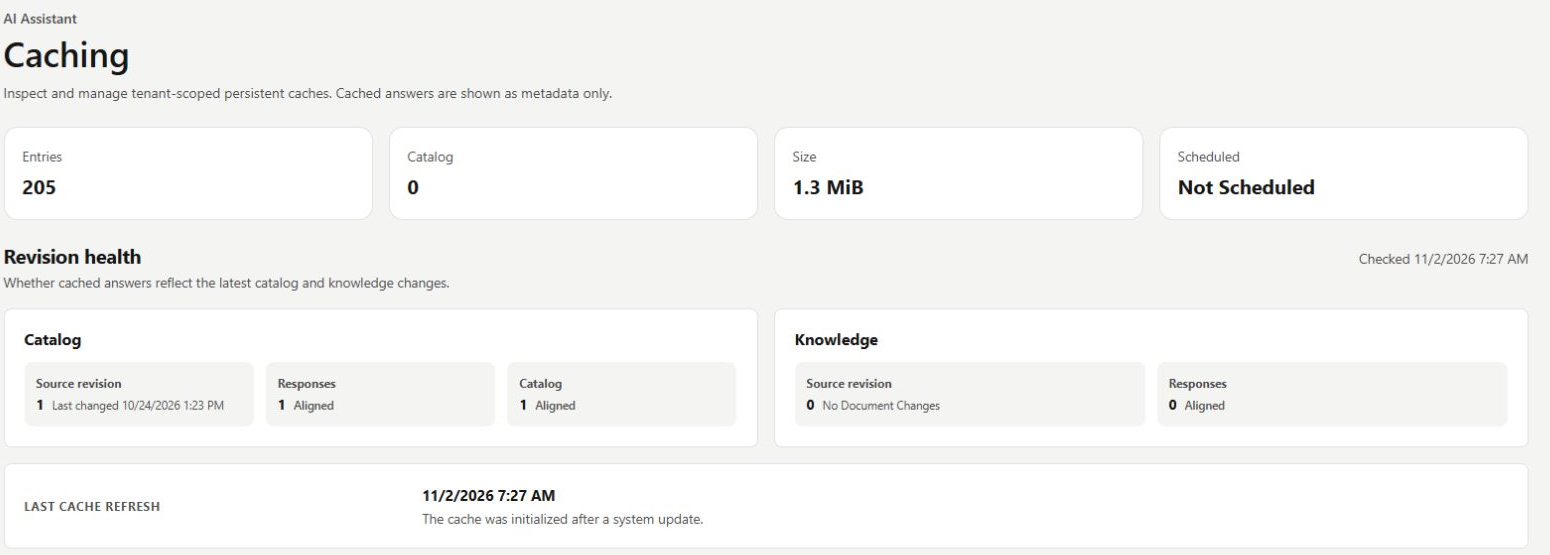
Narrow the view before choosing an action
Use request-metadata search or an entry-type filter to investigate the relevant scope. The response filter below has no matching entries in this example, even though other cached entry types exist. The page shows diagnostic metadata rather than response bodies. Correct stale sources and complete processing before considering a clear operation.
- Remove a single entry when that is the intended scope.
- Review immediate or scheduled purge scope before applying it.
- The full assistant-cache purge preserves query embeddings.

What you can do
Use the visible controls to review the setup and choose the next step.
- Inspect cache inventory and source freshness.
- Search diagnostic request metadata.
- Filter reusable results by entry type.
- Review individual, immediate or scheduled clear controls.
Continue with the Dashboard guides or your inbox.
Good to know
No. Correct the authoritative source and complete its processing first.
Before you begin
Open the intended workspace and review the current state.
- Check the active workspace and your access.
- Review the relevant information and available controls.
- Verify the result after making an intended change.