
Dashboard guide
Decide when AI answers and when your team leads
Set the answering mode that fits how your team works, with clear boundaries for availability and human ownership.

Short answer
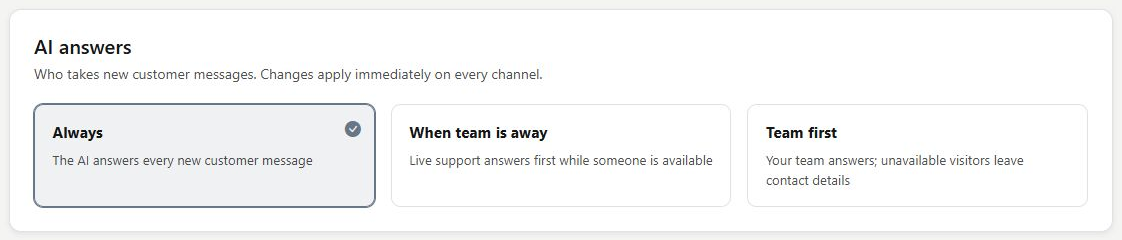
AI answers controls who gets the first chance to handle a customer message. Choose Always for AI-led responses, When team is away for team-first availability, or Team first for human-led service. Review business hours and current ownership as part of that choice: handing one conversation to a person changes that conversation's handling.
Choose the service pattern you can support
Open Setup and find AI answers. Always lets AI answer until a teammate takes the conversation. When team is away gives the team its opportunity while available and lets AI cover the away state. Team first leaves live replies with the team; unavailable visitors can leave contact details.
Connect the mode to actual availability
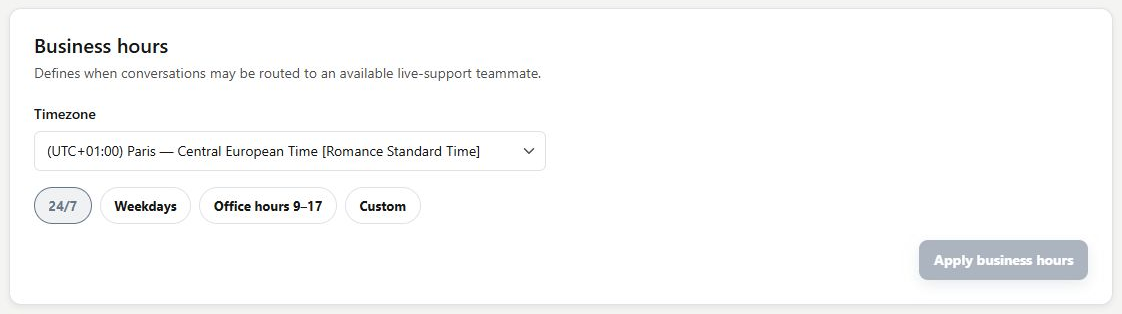
Review Business hours and the team's availability before choosing a mode. A schedule is one input to the experience, while a conversation can also be queued or assigned to a person. After an intended change, check a suitable customer enquiry and the handling label in Conversations.
- The mode applies immediately when selected.
- A human handoff stops AI replies in that conversation until handling is returned.
What you can do
Use the visible controls to review the setup and choose the next step.
- Choose between Always, When team is away and Team first.
- Review the same answering policy from Setup or Conversations.
- Use business hours alongside team availability.
- Override the handling of an individual enquiry through handoff.
Continue with the Dashboard guides or your inbox.
Good to know
Team first is human-led. Do not assume a timed AI takeover. Review the mode's explanation and the offline contact experience.
Before you begin
Open the intended workspace and review the current state.
- Check the active workspace and your access.
- Review the relevant information and available controls.
- Verify the result after making an intended change.