
Dashboard guide
Finish the request and keep its context
Resolve a completed conversation with a useful note, find it in Done and understand automatic closure without losing the history.

Short answer
Resolve marks a request as handled while keeping a short window for the customer to continue. A resolved conversation remains in Done > Resolved for 24 hours; a customer reply during that window reopens it. If the conversation stays resolved, automatic closure follows at roughly 24 to 25 hours. Closure is a lifecycle state, not a seven-day limit on history.
Resolve with a note that explains the outcome
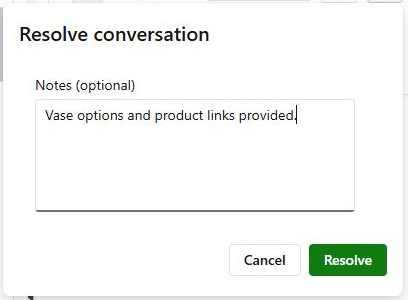
After reviewing the answer and completing the request, use Resolve conversation. Add an optional concise note about what was provided or settled, then confirm Resolve. The example records that vase options and product links were provided in the demonstration conversation. There is no separate manual Close action to look for.
Find completed work in Done
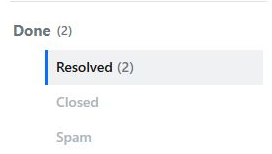
Open Done > Resolved to find conversations still inside the reply window. The owner's staged vase and panther enquiries are counted in Resolved after resolution. If the customer replies during the 24-hour window, the conversation reopens. Otherwise automatic closure finalizes it. Use the date range and relevant status filter to find older work.
- Resolved and Closed describe different lifecycle stages.
- AI can also resolve an unanswered follow-up after 24 hours without a reply.
- An unanswered human-support request can expire after seven days; that is separate from history retention.
What you can do
Use the visible controls to review the setup and choose the next step.
- Resolve a handled request with an optional note.
- Review recently resolved conversations in Done.
- Recognize the reply window and automatic closure.
- Find older conversations without assuming a seven-day history limit.
Continue with the Dashboard guides or your inbox.
Good to know
No. It stays resolved for a 24-hour reply window before automatic closure, usually around 24 to 25 hours.
Before you begin
Open the intended workspace and review the current state.
- Check the active workspace and your access.
- Review the relevant information and available controls.
- Verify the result after making an intended change.