
Dashboard guide
See how much conversation capacity remains
Read current-period usage, add-on balances and expiry dates together without confusing them with message counts or monthly reports.

Short answer
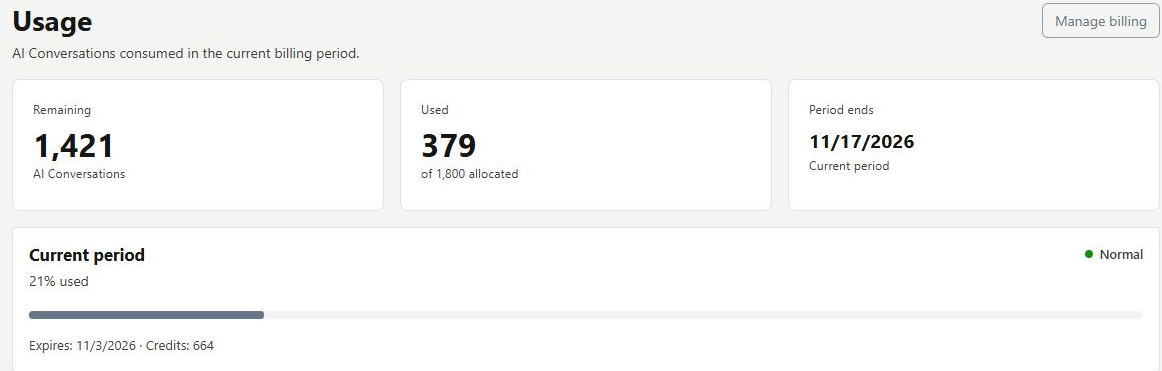
Usage explains AI Conversations used and remaining in the current billing period. Review the period end and the subscription/add-on breakdown, including any one-time balance and expiry. AI Conversations is the displayed billing unit, not a raw message or model-token count. Current-period consumption and historical monthly totals describe different windows.
Read the allowance with its dates
Open Billing > Usage. Check the remaining and used AI Conversations, the allowance and period-end date. Review subscription and add-on components separately, including any expiring one-time balance. The figures below illustrate this workspace's current state; they are not a universal plan allowance.
Use history to understand the pattern
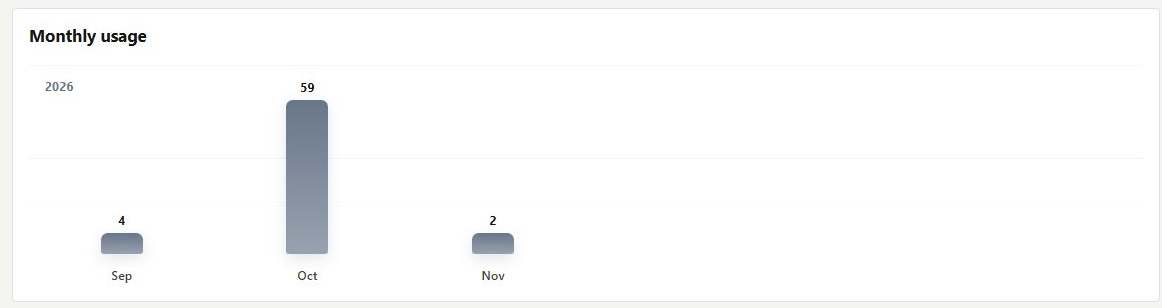
Review the six-month usage history alongside current-period capacity. Calendar-month totals can differ from a subscription period, and add-on expiry is a separate date again. Use Manage billing or Review plan if capacity needs attention, after confirming the actual consumption and terms.
- Compare numbers only after checking their period and scope.
- An unavailable balance is not evidence that it is zero.
- Additional capacity does not correct inaccurate source information.
What you can do
Use the visible controls to review the setup and choose the next step.
- Inspect used and remaining AI Conversations.
- Review the current period-end date.
- Separate subscription and add-on capacity.
- Read historical monthly usage with the correct time basis.
Continue with the Dashboard guides or your inbox.
Good to know
No. AI Conversations is the displayed billing unit, not a raw count of messages.
Before you begin
Open the intended workspace and review the current state.
- Check the active workspace and your access.
- Review the relevant information and available controls.
- Verify the result after making an intended change.