
Dashboard guide
Give answers a reliable source
Choose the right home for files, website pages, short FAQs and business information, then check that the intended source is ready.

Short answer
Your knowledge base brings the business information behind customer answers into one place. Choose a source format that suits the material, review its readiness and maintain the authoritative version when facts change. Adding information is only the first step: the source must be ready, relevant and appropriate for the people who will receive the answer.
Choose the source that fits the information
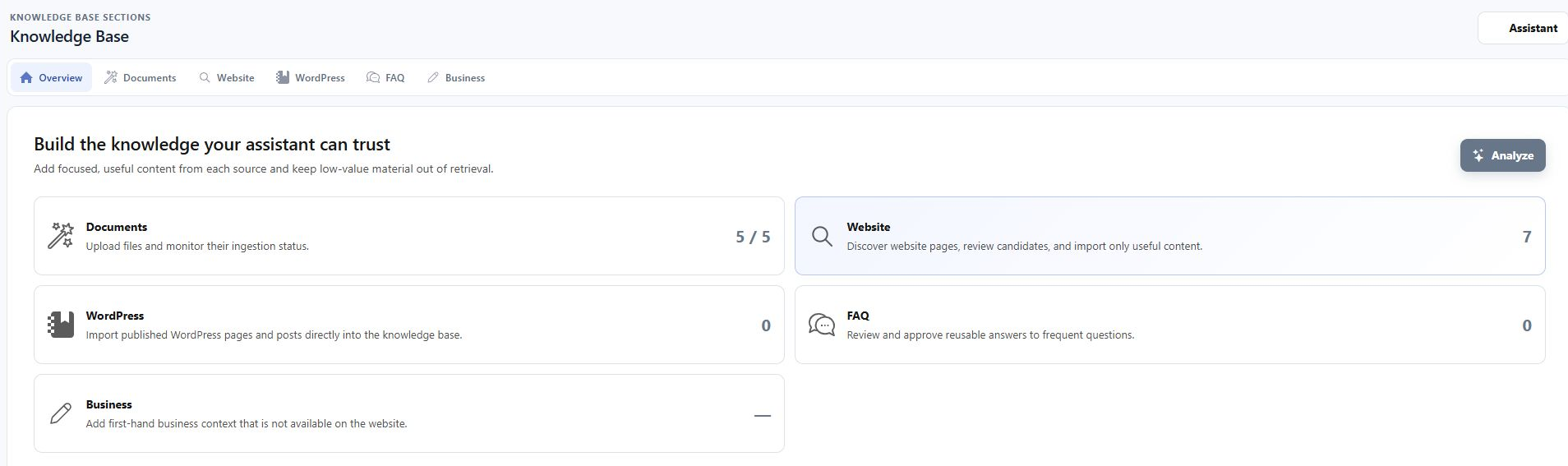
Open AI Assistant > Knowledge base. Documents holds files and supported imported knowledge. Website is for selected public pages; WordPress is a separate route for published site content. FAQ Builder is for concise reviewed answers, while Business holds compact information supplied directly by your business. Open the source card to manage its contents and readiness.
Fix the source, then test the question
If an answer misses an important detail, identify which source should provide it. Correct that source, wait for it to become ready and ask the representative question again. The document summary below is one way to inspect available material before relying on it. Avoid maintaining contradictory copies of the same policy across several imports.
- Ready information can support answers; a count alone does not establish completeness.
- Choose information that is suitable for the intended answering audience.
- Keep changing facts in a source your team can maintain.

What you can do
Use the visible controls to review the setup and choose the next step.
- Choose between documents, website pages, FAQs and direct business input.
- Open source-specific readiness and error details.
- Inspect the material behind an expected answer.
- Retest after correcting an authoritative source.
Continue with the Dashboard guides or your inbox.
Good to know
No. Internal knowledge storage is separate from a public download link. Still review the facts you provide: information can be used in customer answers even when the original file is not publicly downloadable.
Before you begin
Open the intended workspace and review the current state.
- Check the active workspace and your access.
- Review the relevant information and available controls.
- Verify the result after making an intended change.