
Dashboard guide
Give answers clear business boundaries
Write practical owner instructions for uncertainty, unsupported promises and escalation. Save them explicitly and review the applied setup changes.

Short answer
Owner instructions express how you want customer conversations handled when a general style choice is not enough. Write practical rules about uncertainty, unsupported promises and when a person should help, then use Save instructions to apply the intended text. Review Change history afterwards. Instructions guide replies; connected permissions and reliable sources still set their boundaries.
Write rules that help in a real enquiry
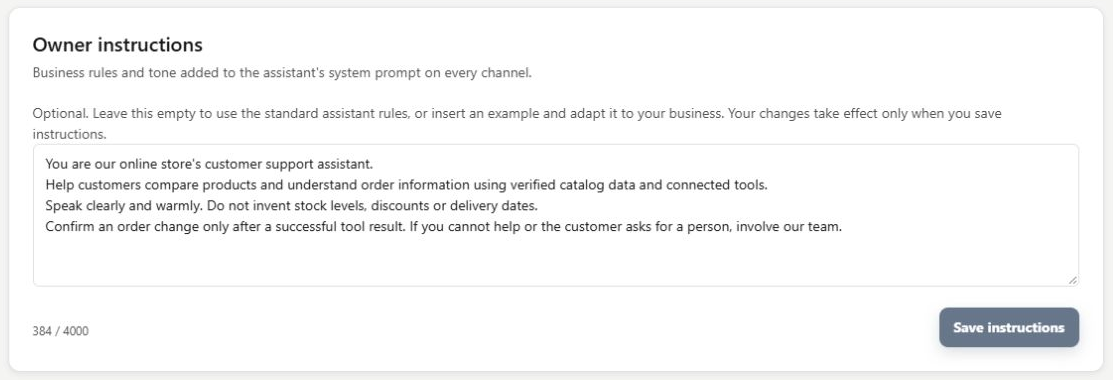
Open Setup > Owner instructions. Describe what the assistant should do in a situation: speak clearly, avoid inventing stock or delivery dates, and ask for help when published information is insufficient. Insert example offers a starting point. Replace it with rules that accurately reflect your business.
Save the intended rule and check the applied state
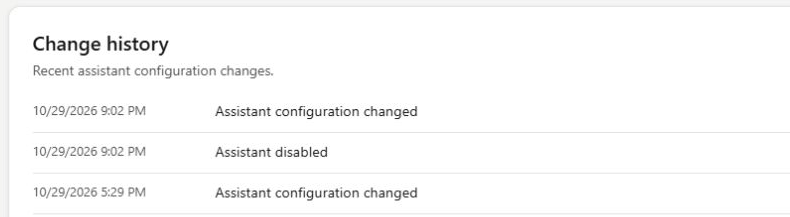
Read the text as a business instruction before choosing Save instructions. The save applies this field; it has a different boundary from the personality's saved-draft and Publish flow. Review Change history for applied setup changes and verify the saved text if the page reports a problem. Do not assume that a failed save changed behaviour.
- Rules cannot create a discount, integration permission or reliable stock fact.
- Review the relevant source when an instruction needs a factual answer.
What you can do
Use the visible controls to review the setup and choose the next step.
- Write concise owner instructions for customer service.
- Start from the built-in example and adapt it.
- Apply this field through its explicit Save instructions action.
- Review applied setup changes in Change history.
Continue with the Dashboard guides or your inbox.
Good to know
Use instructions for handling rules, such as how to respond to uncertainty. Use business knowledge and connected services for the facts an answer needs.
Before you begin
Open the intended workspace and review the current state.
- Check the active workspace and your access.
- Review the relevant information and available controls.
- Verify the result after making an intended change.