
Dashboard guide
Keep a reviewable history of the voice you publish
Separate saved drafts from live behaviour and return to an earlier version through an explicit review and publication step.

Short answer
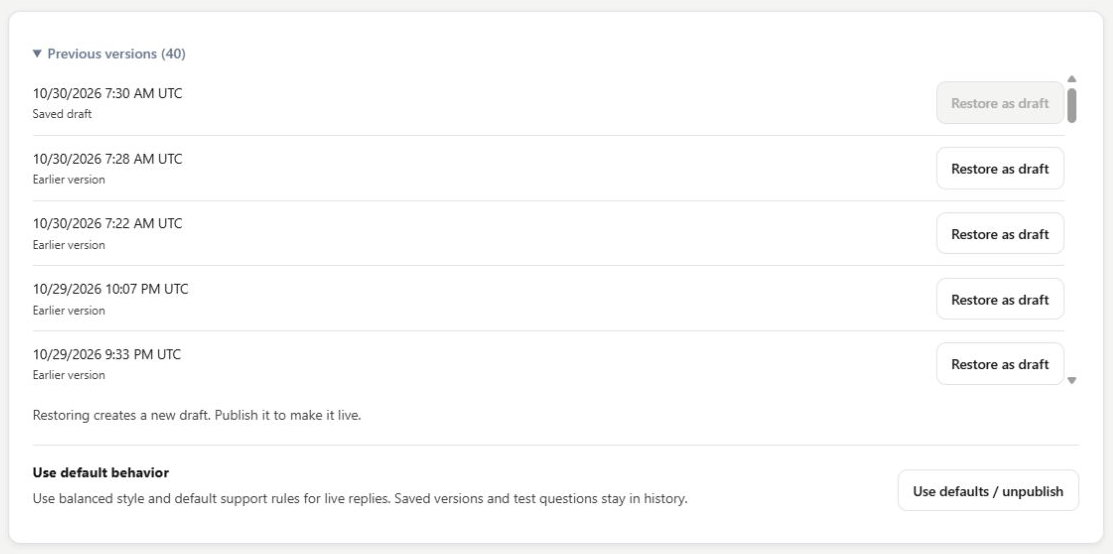
Previous versions keeps saved behaviour available for review. See which version is a saved draft, earlier version or live version, then restore an intended version as a new draft. Rehearse and publish that draft when it is ready. Restoring a version does not silently replace live replies, and the history remains useful when you compare changes.
Find the saved version you meant to use
Open Setup > Assistant behavior > Previous versions. Read the timestamps and labels before selecting anything. The list distinguishes the saved draft, earlier versions and the live version, with Restore as draft available for eligible entries. Choose by the intended behaviour and review history rather than assuming the newest timestamp is live.
Restore into review, then publish deliberately
Restoring creates a new draft. Review the selected communication style and support rules, run representative rehearsal questions, and only then publish. Use defaults / unpublish is a separate consequential choice for returning live replies to balanced style and default support rules; saved versions and questions remain in history.

What you can do
Use the visible controls to review the setup and choose the next step.
- See saved, earlier and live version labels.
- Restore an eligible saved version as a new draft.
- Retain review and rehearsal before publication.
- Use a separate defaults/unpublish control when that is the intended change.
Continue with the Dashboard guides or your inbox.
Good to know
No. Restoration creates a new draft. Publish is still required to make that saved behaviour live.
Before you begin
Open the intended workspace and review the current state.
- Check the active workspace and your access.
- Review the relevant information and available controls.
- Verify the result after making an intended change.