
Dashboard guide
Understand why a product appears in search
Compare semantic, exact-word and image-derived results for the same customer query, then verify the returned items.

Short answer
Search explorer shows how available product-search methods respond to a representative shopper question. Select the channels to compare, run the query and inspect rankings, scores and elapsed time. Use the result to identify missing source facts or wording problems. Retrieval scores are comparison measures, not customer reviews, stock guarantees or a prediction of purchase.
Compare methods using one clear query
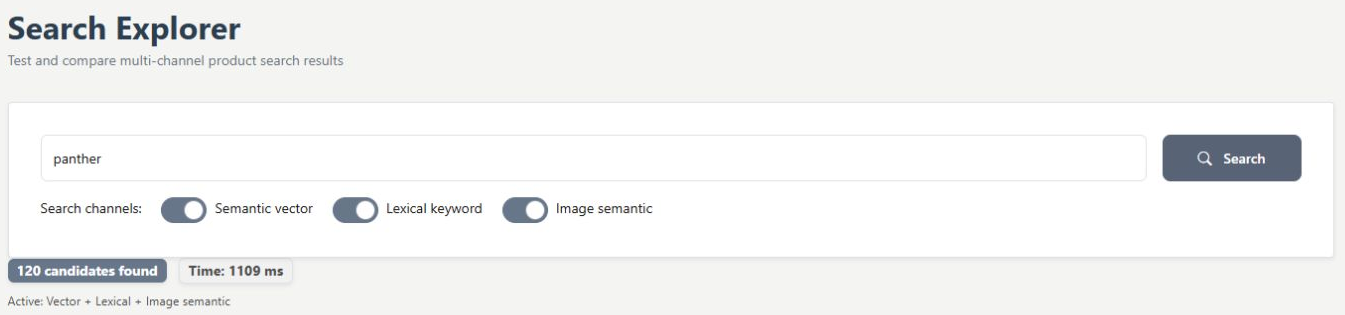
Open Training > Search explorer. Enter a known product or a realistic customer need. Include the semantic-vector, lexical-keyword and image-semantic channels you want to inspect, then choose Search. In the example, panther returns actual catalogue candidates across the available methods.
Check the item behind the ranking
Compare where the same product appears and which channels contributed to the displayed ranking. Semantic search follows meaning, lexical search helps with exact words or identifiers, and image-semantic search uses available image-derived context. Open product information to check whether the item actually meets the customer's need.
- Compare results within their query and channel context.
- Review unavailable-channel status separately from catalogue readiness.
- Improve authoritative descriptions or categories when evidence points to a source gap.

What you can do
Use the visible controls to review the setup and choose the next step.
- Run a representative product query.
- Include or exclude channels for comparison.
- Inspect channel scores, ranking and elapsed time.
- Use results to investigate source information.
Continue with the Dashboard guides or your inbox.
Good to know
No. It is a retrieval comparison measure for the displayed method, not a probability that a recommendation is correct or will sell.
Before you begin
Open the intended workspace and review the current state.
- Check the active workspace and your access.
- Review the relevant information and available controls.
- Verify the result after making an intended change.