
Dashboard guide
See which recommendations lead to a closer look
Compare product recommendations with customer selections, while keeping leads and completed purchases as separate signals.

Short answer
Commerce & leads shows how conversations connect to product discovery. Review lead conversations, captured contacts, recommendations and selections for the chosen period, then compare the product lists. A selection tells you that someone chose to explore a recommendation; it does not by itself prove a purchase, payment or revenue contribution.
Separate the signals in the customer journey
Open Statistics > Commerce & leads and check period and analysis coverage. Lead conversations and captured contacts answer different questions, just as a recommendation and a selection do. Read the labels before comparing counts. A customer can browse several suggested pieces without sharing contact details or buying anything.
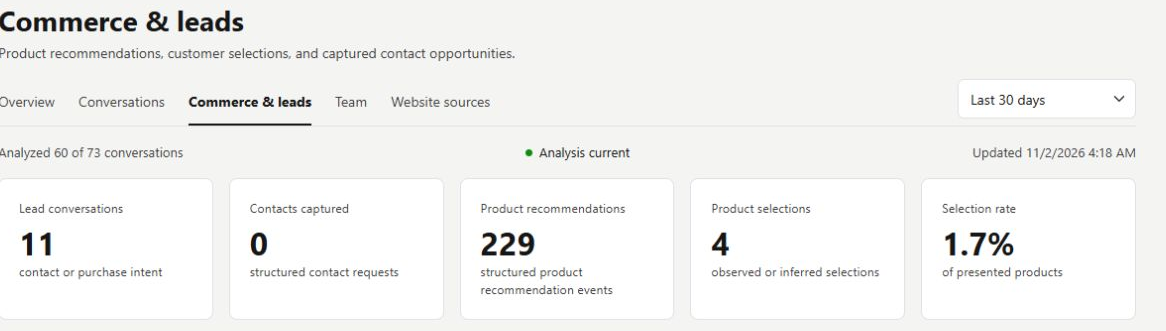
Compare what was shown with what was selected
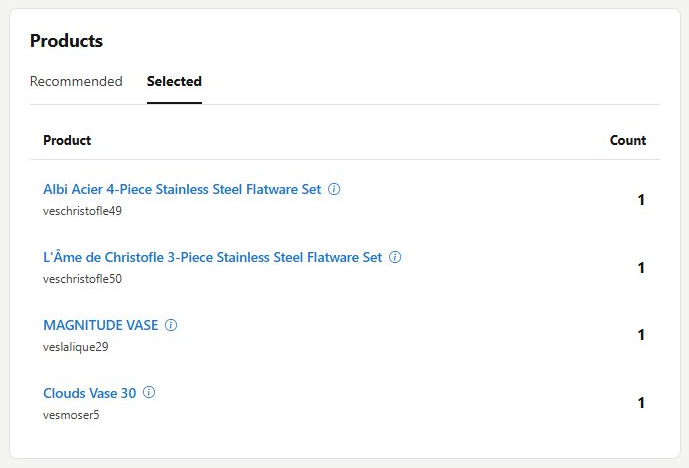
Switch the Products table between Recommended and Selected. Look for the pieces attracting further exploration, then read relevant conversations to understand the request behind them. The two lists may have very different counts and order. Use the connected business evidence separately when checking actual orders.
- The illustrated figures belong to this example workspace and period.
- A recommendation-to-selection share is not a checkout conversion rate.
What you can do
Use the visible controls to review the setup and choose the next step.
- Review conversation-linked commerce and lead signals.
- Compare recommendation and selection counts.
- Switch between recommended and selected product rankings.
- Investigate the customer request behind a product pattern.
Continue with the Dashboard guides or your inbox.
Good to know
No. It is an engagement signal for the recommendation. A completed purchase requires its own order or payment evidence.
Before you begin
Open the intended workspace and review the current state.
- Check the active workspace and your access.
- Review the relevant information and available controls.
- Verify the result after making an intended change.