
Dashboard guide
Understand what customers are asking for
Use conversation intent and analysed outcomes to choose which enquiries, knowledge gaps and service situations deserve a closer look.

Short answer
Conversation insights helps you look beyond a message count. Review analysed resolution measures and the distribution of customer intent for the selected period, then investigate representative exchanges. These categories describe the available conversation analysis; they are not a survey of every website visitor or proof of why a customer made a purchase.
Start with the analysed conversation set
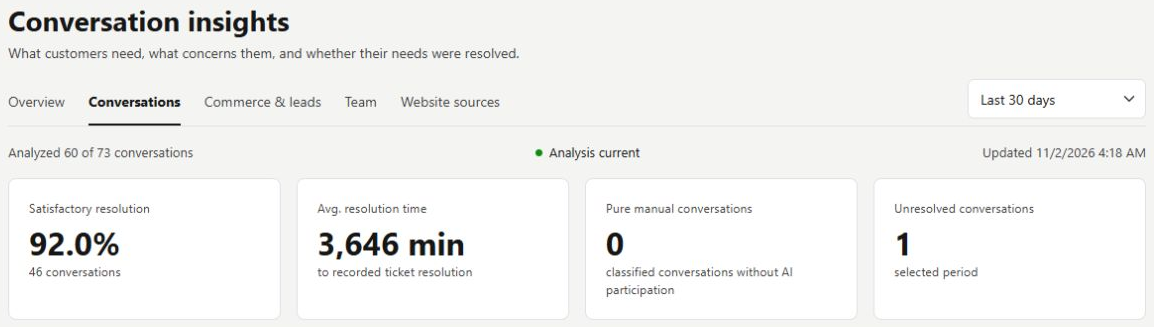
Open Statistics > Conversations. Check the reporting period, analysed coverage and update time before comparing satisfactory resolution, average resolution time and conversation counts. A metric can be unavailable or based on a subset of conversations. Keep the displayed basis in view when discussing service quality.
Turn an intent pattern into a useful review
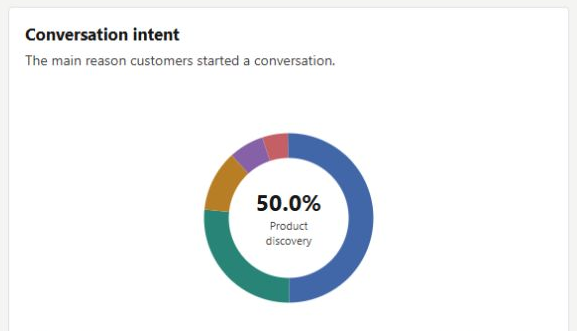
Read the Conversation intent chart and its category counts. Product discovery, general information and other requests may call for different improvements. If many customers are exploring products, inspect the catalogue and recommendation conversations. If a practical question repeats, review its source information before changing the reply style.
- Intent is inferred from available conversations.
- The example chart is a view of this workspace and period, not a claim about all customers.
What you can do
Use the visible controls to review the setup and choose the next step.
- Review conversation analysis for a selected period.
- Read resolution measures alongside coverage.
- Inspect customer intent categories and their shares.
- Use representative enquiries to check what a pattern means.
Continue with the Dashboard guides or your inbox.
Good to know
No. It describes the conversations included in the available analysis. Visitors who never started a conversation are a separate population.
Before you begin
Open the intended workspace and review the current state.
- Check the active workspace and your access.
- Review the relevant information and available controls.
- Verify the result after making an intended change.