
Dashboard guide
Review your subscription before changing it
Check the plan, renewal state and available billing controls, then review any financial change in its own flow.

Short answer
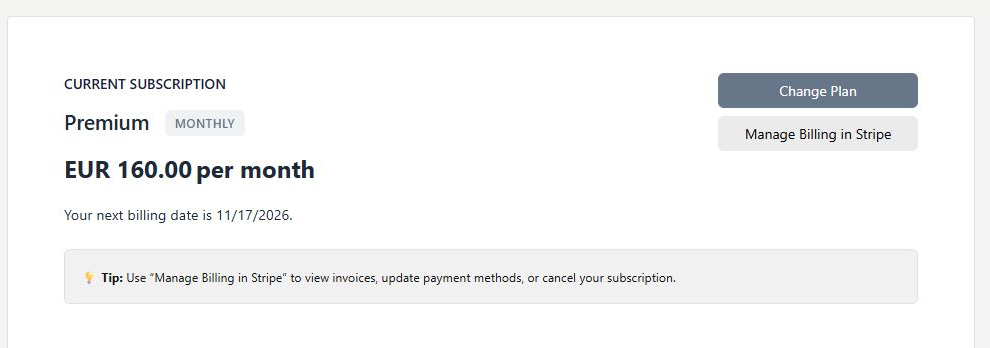
Manage subscription shows the workspace's current plan, billing interval, amount and renewal or cancellation state. It links to plan comparison, supported billing management and additional AI Conversations where offered. Review the actual dates and terms before changing anything. Cancelling a subscription, deleting an account and hiding the widget are separate actions.
Read the current plan and renewal details
Open Billing > Manage subscription. Check the plan, billing interval, price and dates for the selected workspace. The example is an existing account state, not a new offer. Use Change Plan to compare the live catalogue and Manage Billing in Stripe to review the supported invoice, payment-method and cancellation options.
Review additional capacity on its own terms
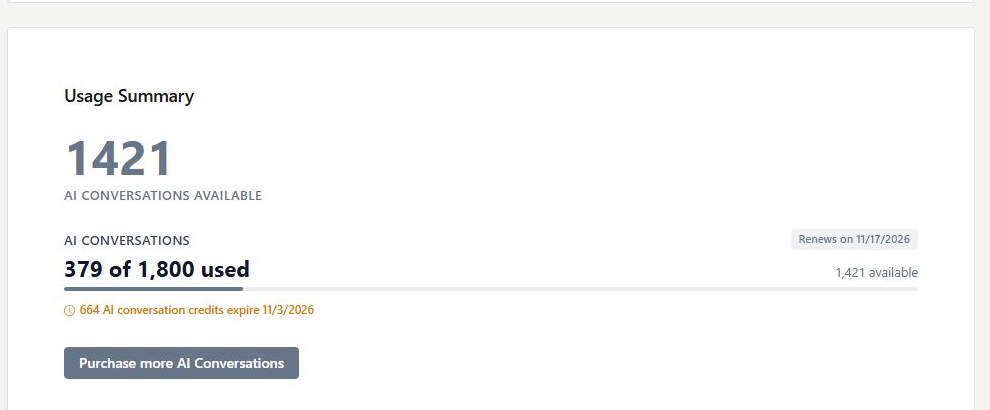
The Usage Summary provides context for remaining capacity. If Purchase more AI Conversations is offered, review the pack's amount, price, recurring or one-time terms and expiry before payment. A return notice or delayed refresh is not a reason to repeat a payment. Verify the existing operation first.
- Use the effective cancellation date shown in the billing flow.
- Check add-on terms separately from the base subscription.
- Keep knowledge, tone and provider permissions in their own settings.
What you can do
Use the visible controls to review the setup and choose the next step.
- Review the current subscription and billing interval.
- Inspect renewal or cancellation dates.
- Open supported billing-management options.
- Review additional capacity before committing to it.
Continue with the Dashboard guides or your inbox.
Good to know
No. Subscription cancellation and workspace closure are separate actions.
Before you begin
Open the intended workspace and review the current state.
- Check the active workspace and your access.
- Review the relevant information and available controls.
- Verify the result after making an intended change.