
Dashboard guide
Prepare a WhatsApp template before provider review
Check the business connection, write a clear text template and distinguish preparation, submission, approval and sending.

Short answer
Message templates helps you prepare supported WhatsApp text templates and follow Meta's review state for the connected business account. Review the name, category, language and body before submission. A prepared form is not submitted, a submitted template is not approved, and an approved template does not itself send a customer message.
Prepare the name, language and message
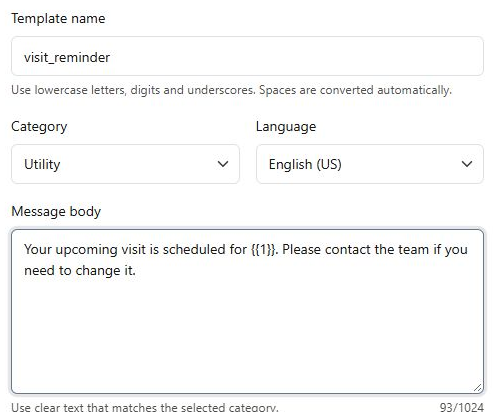
Open the connected WhatsApp integration's templates page and confirm the intended business account. Template names use lowercase letters, digits and underscores. Choose the category and language, then write the message body. This example is a preparation only: the workspace connection has not been completed and the template has not been submitted.
Read the preview before submitting
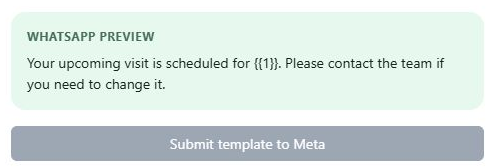
Review the WhatsApp preview for the exact message and any variables. Choose Submit template to Meta only after the required connection is ready and the wording has been checked. New submissions remain Pending while Meta reviews them. Refresh statuses to inspect the provider's current decision and review returned errors before retrying.
- Your team cannot approve its own template.
- A successful submission does not prove approval or delivery.
- A template does not add WhatsApp sending to every Messaging workflow.
What you can do
Use the visible controls to review the setup and choose the next step.
- Prepare a supported text template.
- Choose the template's category and language.
- Review its message preview.
- Monitor the provider's decision after an intended submission.
Continue with the Dashboard guides or your inbox.
Good to know
No. Meta reviews the submission. Pending means a decision is still outstanding.
Before you begin
Open the intended workspace and review the current state.
- Check the active workspace and your access.
- Review the relevant information and available controls.
- Verify the result after making an intended change.