
Document knowledge · Product catalogues
Turn business documents into a searchable knowledge base
Submit product catalogues, manuals, price lists and other business files from a phone or the web, then find exact terms or search by meaning without losing text, images or page context.

Short answer
ValueSpace lets a business add product catalogues, manuals, price lists, specifications and other approved documents to a knowledge base from a phone or the web. Once the documents are processed and validated, the team can find exact SKUs, terms and phrases with lexical search or ask broader questions with semantic search. Results retain links to the source text, images, tables and page locations.
Add business documents from your phone or the web
A business can submit product catalogues, operating manuals, price lists, specifications, policies and other approved files from a phone or through the web. ValueSpace prepares them as one searchable knowledge base instead of requiring the team to copy information into a new system by hand.
- The same knowledge-base workflow accepts documents submitted from a phone or a web interface.
- Scanned page text can be recognised through OCR while its location on the original page remains available for verification.
- Text, tables, product images, captions and page coordinates stay associated instead of being flattened into an unstructured text dump.
- Lexical search finds exact identifiers and phrases, while semantic search finds relevant information when the question uses different wording.
Submit
Phone or web
Submit approved business documents
Organise
One knowledge base
Catalogues, manuals, price lists and other files
Preserve
Text, images and coordinates
Products remain connected to their source layout
Use
Exact terms and meaning
Use lexical and semantic search
A PDF page is a source location, not necessarily a product boundary
Supplier catalogues often begin a product family on one page and continue its variants, accessories or conditions on the next. Splitting at every page boundary can separate a product name from its SKU, price, dimensions or image and can make later search return an incomplete answer.
- Page numbers remain source anchors so a result can point back to the document.
- Headings, tables, paragraphs and figures retain their order and page regions.
- Repeated product names, continuing tables and related SKU families help identify content that belongs together.
- Headers, footers and page-break markers do not become products merely because they contain text.
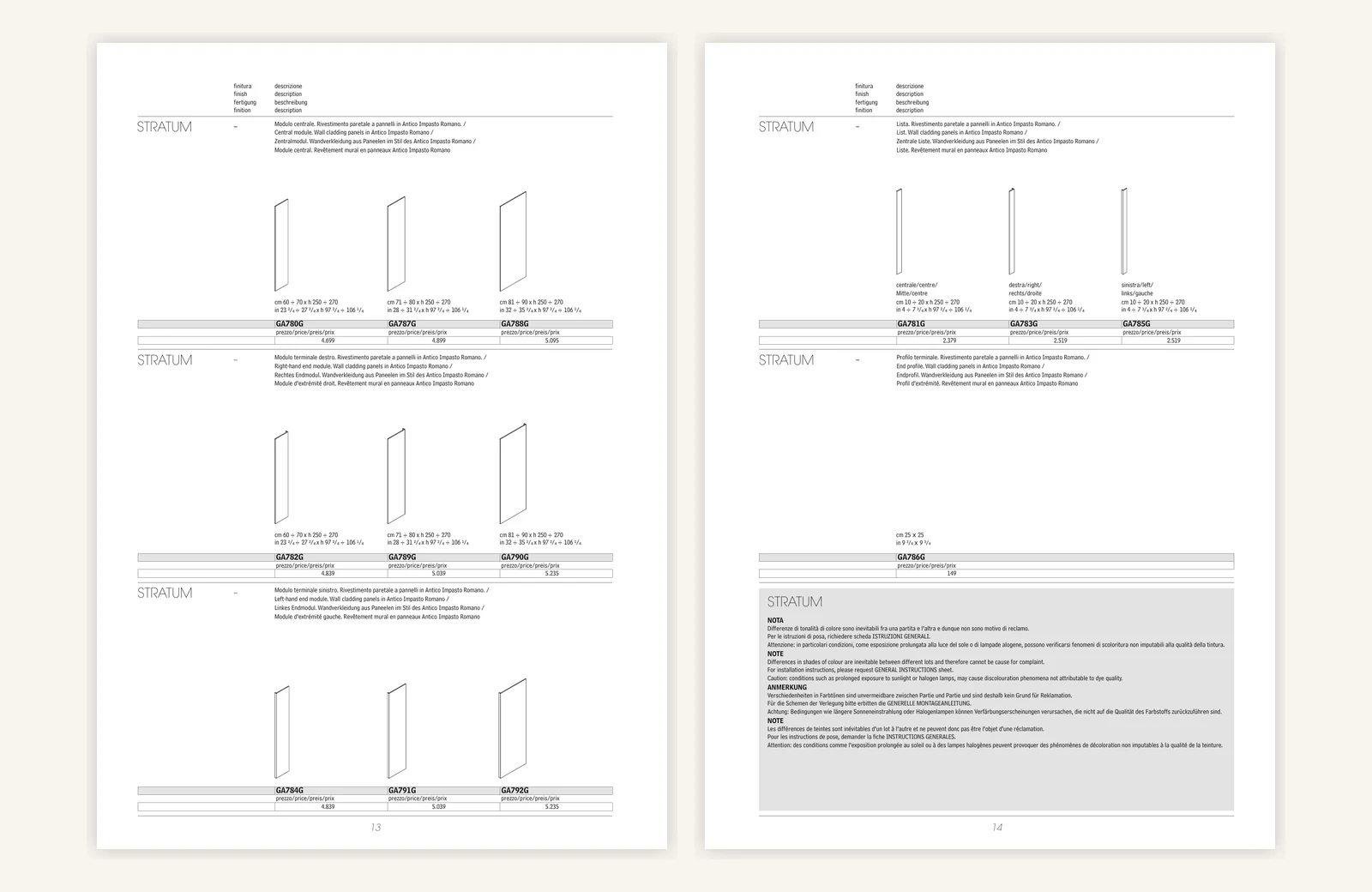
From document pages to one verifiable product record
The useful public model has four stages. The uploaded file is recorded, its visible regions are mapped, connected regions are assembled into a product unit, and the validated outputs become searchable. The implementation details behind those stages are not needed to understand or verify the result.
Source
PDF accepted
Pages, text, tables and figures are recorded
Boundaries
Related regions joined
A product may continue across pages
Verification
JSON and Markdown checked
SKUs, prices, images and source links remain grounded
Outcome
Ready to search
Answers can return to the source pages
Example JSON output for the STRATUM product family
This public example is limited to STRATUM rather than the entire 32-page document. It shows the stable information needed for product lookup: the family boundary, page regions, figure anchors, component groups, SKU variants and lossless prices. Page-region coordinates are normalised from 0 to 1 so they remain usable independently of render size.
- The source string is preserved alongside the normalised price value.
- The document-level EUR currency applies to the product variants in this price list.
- Figure corners keep each extracted image tied to its original page position.
- The notes region is linked to STRATUM for search but is not converted into a product variant.
{
    "productFamily": "STRATUM",
    "source": {
      "pdfPages": [21, 22],
      "printedPages": [13, 14],
      "segmentRange": {
        "start": "p0021-s0003",
        "end": "p0022-s0019"
      },
      "pageRegions": [
        { "page": 21, "box": [0.071, 0.098, 0.905, 0.955] },
        { "page": 22, "box": [0.095, 0.098, 0.902, 0.664] }
      ],
      "figures": [
        {
          "imageRef": "p0021-f001",
          "page": 21,
          "corners": [[0.3121, 0.1940], [0.3353, 0.1940], [0.3353, 0.3082], [0.3121, 0.3082]]
        },
        {
          "imageRef": "p0021-f002",
          "page": 21,
          "corners": [[0.5098, 0.1910], [0.5406, 0.1910], [0.5406, 0.3083], [0.5098, 0.3083]]
        },
        {
          "imageRef": "p0021-f003",
          "page": 21,
          "corners": [[0.7071, 0.1848], [0.7530, 0.1848], [0.7530, 0.3083], [0.7071, 0.3083]]
        }
      ]
    },
    "components": [
      {
        "type": "central-module",
        "imageRef": "p0021-f001",
        "variants": [
          { "sku": "GA780G", "widthCm": "60-70", "price": { "sourceText": "4.699", "amount": 4699, "currency": "EUR" } },
          { "sku": "GA787G", "widthCm": "71-80", "price": { "sourceText": "4.899", "amount": 4899, "currency": "EUR" } },
          { "sku": "GA788G", "widthCm": "81-90", "price": { "sourceText": "5.095", "amount": 5095, "currency": "EUR" } }
        ]
      },
      {
        "type": "right-hand-end-module",
        "imageRef": "p0021-f002",
        "variants": [
          { "sku": "GA782G", "widthCm": "60-70", "price": { "sourceText": "4.839", "amount": 4839, "currency": "EUR" } },
          { "sku": "GA789G", "widthCm": "71-80", "price": { "sourceText": "5.039", "amount": 5039, "currency": "EUR" } },
          { "sku": "GA790G", "widthCm": "81-90", "price": { "sourceText": "5.235", "amount": 5235, "currency": "EUR" } }
        ]
      },
      {
        "type": "left-hand-end-module",
        "imageRef": "p0021-f003",
        "variants": [
          { "sku": "GA784G", "widthCm": "60-70", "price": { "sourceText": "4.839", "amount": 4839, "currency": "EUR" } },
          { "sku": "GA791G", "widthCm": "71-80", "price": { "sourceText": "5.039", "amount": 5039, "currency": "EUR" } },
          { "sku": "GA792G", "widthCm": "81-90", "price": { "sourceText": "5.235", "amount": 5235, "currency": "EUR" } }
        ]
      },
      {
        "type": "list-module",
        "variants": [
          { "sku": "GA781G", "position": "centre", "widthCm": "10 or 20", "price": { "sourceText": "2.379", "amount": 2379, "currency": "EUR" } },
          { "sku": "GA783G", "position": "right", "widthCm": "10 or 20", "price": { "sourceText": "2.519", "amount": 2519, "currency": "EUR" } },
          { "sku": "GA785G", "position": "left", "widthCm": "10 or 20", "price": { "sourceText": "2.519", "amount": 2519, "currency": "EUR" } }
        ]
      },
      {
        "type": "end-profile",
        "variants": [
          { "sku": "GA786G", "sizeCm": "25 x 25", "price": { "sourceText": "149", "amount": 149, "currency": "EUR" } }
        ]
      }
    ],
    "searchAnchors": [
      "STRATUM",
      "Antico Impasto Romano",
      "GA780G",
      "GA786G",
      "central module",
      "end profile"
    ]
}Example Markdown output keeps the product readable
The structured object supports precise lookup, while Markdown preserves a readable version for questions and source review. The example uses shortened image references instead of tenant-specific storage addresses and keeps the page transition explicit.
## STRATUM
Wall cladding panels in Antico Impasto Romano.
### Central module

| SKU | Width | Height | Price |
| --- | --- | --- | ---: |
| GA780G | 60-70 cm | 250 or 270 cm | EUR 4,699 |
| GA787G | 71-80 cm | 250 or 270 cm | EUR 4,899 |
| GA788G | 81-90 cm | 250 or 270 cm | EUR 5,095 |
### Right-hand and left-hand end modules
The matching end modules and their images remain part of the same STRATUM family.
<!-- Source continues from PDF page 21 to PDF page 22 -->
### List modules and end profile
| SKU | Position or size | Price |
| --- | --- | ---: |
| GA781G | Centre list, 10 or 20 cm | EUR 2,379 |
| GA783G | Right list, 10 or 20 cm | EUR 2,519 |
| GA785G | Left list, 10 or 20 cm | EUR 2,519 |
| GA786G | End profile, 25 x 25 cm | EUR 149 |
### Product notes
Colour shades may vary between lots. Request the general installation instructions. Prolonged exposure to sunlight or halogen lamps may cause discolouration.Search combines exact terms, meaning and source anchors
Lexical search retrieves exact SKUs, identifiers and phrases. Semantic search finds relevant information when a question uses different wording. ValueSpace can combine both with structured fields and source anchors that return the result to the supporting page and figure.
- A search for GA786G can return the end profile rather than an unrelated STRATUM module.
- A question about the cheapest STRATUM component can use normalised prices while still displaying the source text.
- A question about installation or colour variation can retrieve the product notes without converting those notes into products.
- A reviewer can trace the answer to PDF pages 21-22 and the relevant source region.
The whole document becomes searchable only after validation
The outputs are checked against the recorded source before they become active. The check covers identity, source coverage, tables, image references, product relationships and lossless values such as SKU and price. A partially processed catalogue is not reported as ready to search.
- Completed source-page work is retained when a later check fails.
- Only the affected product unit needs correction when earlier stages remain valid.
- The document becomes active as one confirmed generation after every required unit passes.
- If a bounded correction cannot resolve the discrepancy, the import remains in a review-required state instead of publishing uncertain data.
What still requires review
Complex catalogues can contain scanned pages, missing headings, ambiguous decimal separators, repeated product names and drawings that are not embedded as ordinary images. Source regions and validation reduce these risks but do not remove the need for a representative test set and human review of business-critical data.
- Confirm the document currency, decimal convention and units before using prices operationally.
- Check that the business has permission to store and search the supplied catalogue and images.
- Treat the visible source-page example as an explanation of document structure, not as a customer result.
- Confirm the completed search result against the imported source pages before operational use.
Capacity and processing SLA
The processing window is based on the accepted source set, total page volume, scan quality and any validation that needs review. These targets begin once the files are accessible and the business has confirmed permission to process them.
- Parallel onboarding: ValueSpace can process 30-50 documents at the same time, including product catalogues, manuals, price lists and specification packs.
- Rapid path: a document or agreed batch of up to about 50 pages follows the fast processing path when the files are readable and do not require manual clarification.
- Standard large-document target: documents or agreed batches from 50 to 3,000 pages normally complete within 1-24 hours.
- No fixed page cap: page count is not used as a hard onboarding limit. Larger collections can be staged, with a completion window confirmed for the source set.
- Review exceptions: damaged files, unclear scans, protected PDFs, ambiguous currencies or product boundaries can pause activation until the affected evidence is resolved.
How this works in ValueSpace
ValueSpace turns approved business documents into a source-linked knowledge base while keeping the visible outcome separate from the private implementation. The user sees the intake, readiness, searchable result and any review boundary.
- Documents can be submitted from a phone or through the web.
- Product catalogues, manuals, price lists, specifications, policies and other approved files can join one knowledge base.
- The uploaded files remain available as source documents for the import.
- ValueSpace records OCR text, tables, figures, coordinates and their source relationships.
- Product boundaries can span consecutive pages when the source shows that the same product family continues.
- Lexical search supports exact identifiers and phrases, while semantic search supports questions expressed in different words.
- Validation prevents incomplete or inconsistent document generations from becoming searchable.
For the broader file workflow, see how ValueSpace works with business documents and files.
Frequently asked questions
The same workflow can accept product catalogues, operating manuals, price lists, specifications, policies and other approved business documents. The STRATUM catalogue is one detailed example, not a limit on the document types ValueSpace can organise.
What to prepare for a reliable catalogue test
Use a representative document and known answers so source continuity, structured values and search results can be reviewed together.
- The business-document set you are authorised to store and process, submitted from a phone or through the web.
- The expected catalogue count and approximate page volume so the processing window can be confirmed.
- At least one representative product that spans pages or combines text, tables and images.
- The expected product family, SKUs, currency, prices, units and image associations for the chosen example.
- Questions that test a SKU, a price comparison, a product note and a cross-page relationship.
- A final source-linked search result that can be checked after the import completes.